Connecti5 vs CamCard: Which Contact App Should You Use?
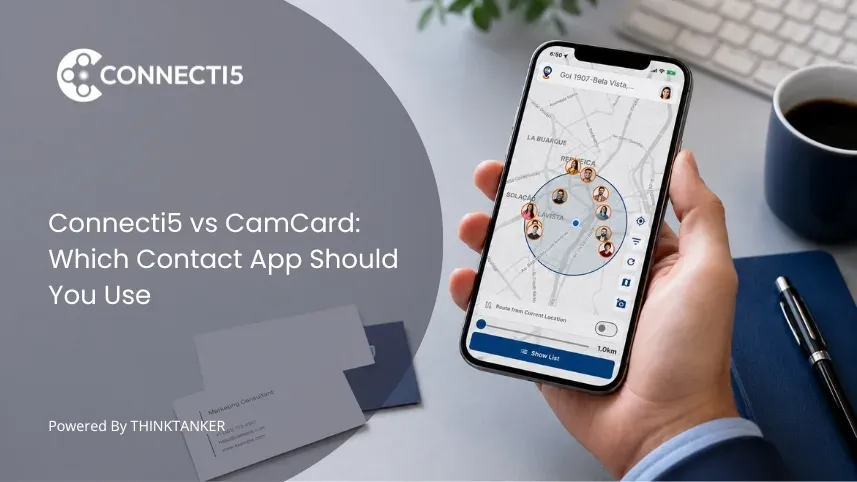

If you are looking at both Connecti5 and CamCard, chances are you want to stop losing business contacts and start actually using the network you have built. Both apps help you scan business cards and save contact details, but they solve different problems after the contact is saved. After that, the two apps go in very different directions.
This comparison covers what each app does well, where they differ, and which one makes more sense depending on how you work.
Connecti5 vs CamCard: The Short Version
CamCard is well known for business card scanning, contact extraction, and digital card sharing. It reads a physical business card and saves the contact details accurately. It has since grown into a polished digital business card and sharing tool too. If that is the core of what you need, it is a solid and well-established option.
Connecti5 starts where most card scanners stop. Once a contact is saved, Connecti5 places them on a private contact map, shows you when they are nearby using proximity detection, lets you plan visit routes around them, and searches your entire network using AI-powered natural language queries. It also gives you your own digital business card and an NFC card so sharing your details is as fast as scanning someone else's.
Feature Comparison
| Feature | Connecti5 | CamCard |
|---|---|---|
| Business card scanning | Yes | Yes |
| Private contact map | Yes | No |
| Find nearby contacts by distance | Yes | No |
| AI natural language contact search | Yes | No |
| Contact route planner | Yes | No |
| Smart filters (industry, group, location) | Yes | Limited |
| Pinned contacts | Yes | No |
| Digital business card (link / QR) | Yes | Yes |
| NFC business card | Yes | No |
| One-tap call, message, navigate | Yes | No |
| Localized pricing by region | Yes | No |
| Free plan | Yes | Yes |
| iOS and Android | Yes | Yes |
Where Connecti5 Goes Further
Your contacts on a map
The biggest difference between the two apps is geography. When you save a contact in Connecti5, they appear as a pin on your private contact map, visible only to you. Over time, as you scan cards and add contacts, your entire professional network becomes something you can see and act on geographically. If the idea is new to you, it is worth reading how it feels to see your entire contact list on one map.
This matters most for professionals who travel for work. Before a trip to a new city, you can open Connecti5 and see every contact you have there, filter by industry or profession, and spot who is clustered in the same area. CamCard stores contacts as a searchable list, not a geographic map. That distinction is the same reason many professionals weigh a private contact map against a traditional CRM.
Finding nearby contacts before it is too late
The Find Nearby Contacts feature shows you which of your saved contacts are within 5, 10, or 20 kilometres of your current location. For field sales teams, consultants, and anyone who travels for client meetings, this can be one of the most useful features in the subscription. It is the practical version of asking whether an app can filter your contacts by distance nearby.
The scenario it solves is simple: you are already in an area for one meeting and three other contacts are five kilometres away. Without proximity detection, you never know they are there. With Connecti5, you see them the moment you open the app.
Searching your contacts with AI
CamCard is mainly built around scanning, storing, organizing, and sharing contacts, while Connecti5 focuses more on map-based discovery and natural-language network search.
Ask My Network lets you type a plain-language query into the search bar, such as "Who do I know in Bangalore who works in pharmaceuticals?" or "Which of my contacts are in the IT sector in Pune?", and it returns the right contacts immediately. No filters to configure. No scrolling through hundreds of entries. If you manage more than a hundred contacts, this difference becomes significant every day.
Sharing your own contact details
Both apps let you share your own details digitally. CamCard offers a digital business card by QR code and link, and Connecti5 offers ConnectLink, a permanent digital profile with your contact number, email, social links, and business information, shareable by link, QR code, or NFC tap. Anyone can view your profile without downloading any app.
Where Connecti5 goes a step further is the NFC card: a single tap transfers your full digital profile to another person's phone, with no paper card and no manual sharing, and that card is tied into the same network that maps and surfaces your contacts.
If your network has already outgrown a flat list, it is worth seeing how this works in practice. You can explore how Connecti5 works and decide for yourself before you switch.
When CamCard Might Be the Right Choice
If business card scanning and digital card sharing are the core of what you need, including accurate OCR, contact extraction, storage, and a polished digital card, CamCard is a mature and reliable option with a large user base. It also has team features and CRM integrations for enterprise-level card management that are not a focus of Connecti5. If your main worry is simply the pile of cards from your last event, our guide on what to do with business cards after a networking event applies to either app.
If your contact list has more than a hundred entries, if you travel for work, if you visit clients in the field, or if you want your network to be searchable and geographically useful, Connecti5 may be the better fit for users who need map-based networking, proximity search, AI contact search, and route planning.
Pricing
Both apps have a free plan. Connecti5 localizes pricing by region: users in India see Indian Rupees, starting at Rs 199 per month (Proximity) and Rs 499 per month (Elite), while users outside India see the equivalent plans in US dollars. CamCard prices in US dollars across markets.
The practical takeaway is simple. If you are based in India, Connecti5 shows you a rupee price with no mental currency conversion. If you are anywhere else, you will see Connecti5 in dollars, so the decision comes down to features rather than currency.
Which Should You Choose?
If you are a field sales professional, a pharma medical rep, or a serious networker who manages contacts across a territory or multiple cities, Connecti5 gives you tools that CamCard does not have: a map, proximity, AI search, and route planning.
If you mainly need to scan business cards, store them, and share a digital card, either app does the job, and CamCard has more history behind it.
You can try Connecti5 free on iOS and Android, no credit card required. Start with 50 contacts and see if the map and proximity features change how you think about your network.